Sunday, April 28, 2019

fresh buster installation

A few shots of my Xfce desktop in Debian Buster (still the current "Testing") (see https://wiki.debian.org/DebianTesting and https://www.debian.org/releases/testing/), which I installed using debian-buster-DI-rc1-amd64-netinst.iso, on my old Compaq Presario CQ57:


Some of the packages I added post-install:

doublecmd-gtk geany nomacs audacious udiskie ntp galculator lightdm-gtk-greeter-settings mc evince geeqie gparted localepurge firmware-linux-free firmware-linux-nonfree firmware-realtek neofetch inxi orage

I'm using the following lines in my /etc/apt/sources.list file:

deb http://ftp.us.debian.org/debian/ buster main contrib non-free
deb http://security.debian.org/debian-security buster/updates main contrib non-free

A Debian "network install" (see: https://www.debian.org/CD/netinst/) gives me a nice starting point for when I want to kinda build my own system from the ground up, and with Xfce I have a lot of options and flexibility for setting up the desktop to suit my tastes. I bring in a handful of apps that I prefer to use instead of some of the Xfce defaults -- Double Commander instead of Thunar, Geany instead of Mousepad, and Nomacs instead of Ristretto, for example.

The end result is a near-perfect setup, in my opinion.


There had been some concern that Synaptic would be left out of Debian Buster. I don't really use Synaptic anymore as I prefer to do my package management from the command line, but I found that Synaptic came in as part of the default installation. Also, Synaptic now shows up in the Buster repos when I search for it at the Debian Packages site. Good news for many users.

The Debian project's home page: https://www.debian.org/

Saturday, March 30, 2019

so much for all that

Feeling sad and depressed as I read the latest news and ponder these words:

Not like the brazen giant of Greek fame,
With conquering limbs astride from land to land;
Here at our sea-washed, sunset gates shall stand
A mighty woman with a torch, whose flame
Is the imprisoned lightning, and her name
MOTHER OF EXILES. From her beacon-hand
Glows world-wide welcome; her mild eyes command
The air-bridged harbor that twin cities frame.

"Keep, ancient lands, your storied pomp!" cries she
With silent lips. "Give me your tired, your poor,
Your huddled masses yearning to breathe free,
The wretched refuse of your teeming shore.
Send these, the homeless, tempest-tost to me,
I lift my lamp beside the golden door!"


Sunday, February 24, 2019

spartans, wolverines

Michigan vs. Michigan State has been one of college basketball's greatest rivalries. Today they played at UofM's Crisler Arena in Ann Arbor, with MSU coming out on top, 77-70. Huge road win for the Spartans, who (for the moment) take over 1st place in the Big Ten Conference standings.

The two teams will meet again on March 9th in East Lansing. UofM leads head-to-head over the years, 100-82. In the NCAA Tournament, all-time, MSU can claim bragging rights, but not by much:

National Championships - Michigan State 2, Michigan 1
Tournament 2nd Place finishes - Michigan 6, Michigan State 1
Final Fours - Michigan State 9, Michigan 8
Elite Eights - Michigan 14, Michigan State 13
Sweet Sixteens - Michigan State 19, Michigan 15
Tournament Appearances - Michigan State 32, Michigan 28

Monday, February 18, 2019

all the number ones

A little history for ya. The No. 1 distros for each calendar year, according to the page hit rankings at DistroWatch:

2002 - Mandrake
2003 - Mandrake
2004 - Mandrakelinux
2005 - Ubuntu
2006 - Ubuntu
2007 - Ubuntu
2008 - Ubuntu
2009 - Ubuntu
2010 - Ubuntu
2011 - Mint
2012 - Mint
2013 - Mint
2014 - Mint
2015 - Mint
2016 - Mint
2017 - Mint
2018 - Manjaro


There's a good chance that MX Linux will be the No. 1 for 2019.

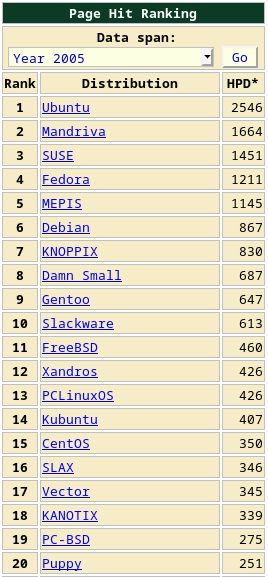
The Top 20 distros for 2005, when I first got going with Linux (I was running Linspire and playing around with KNOPPIX; I switched to MEPIS later), according to DistroWatch's page hit rankings:


And the Top 20 over the past 30 days:


How things have changed! Note that Debian comes in at #6 on both lists.

Sunday, February 17, 2019

openbox: dmenu, gmrun

I haven't decided which application launcher I like better between gmrun and dmenu. Here's a shot of my Openbox menu in Arch, with obmenu opened to show how I set up gmrun and dmenu menu entries:


But I also have keystrokes for gmrun (Alt+F2) and dmenu (Super+Space). From the "keyboard" section of ~/.config/openbox/rc.xml:

    <!-- Added by Steve -->
    <!-- Winkey+Space starts dmenu -->
    <keybind key="W-space">
      <action name="Execute">
        <command>dmenu_run -b</command>
      </action>
    </keybind> 
    <!-- Added by Steve -->
    <!-- Alt+F2 starts gmrun -->
    <keybind key="A-F2">
      <action name="execute">
         <execute>gmrun</execute>
      </action>
    </keybind>


The menu entries are handy to have, but I normally use the keystrokes.
 

Thursday, February 7, 2019

purge residual config files via GUI or CLI

From Synaptic in Kubuntu 18.04, I clicked on the "Status" button and found three items listed under "Not installed (residual config)":


One way to get rid of those is to select each item and mark them for "Complete Removal", then click the "Apply" button. However, they can also be found and removed via the command line. To find them, I used the dpkg -l | grep ^rc command:

$ dpkg -l | grep ^rc
rc  linux-image-4.15.0-42-generic                   4.15.0-42.45                                amd64        Signed kernel image generic
rc  linux-modules-4.15.0-42-generic                 4.15.0-42.45                                amd64        Linux kernel extra modules for version 4.15.0 on 64 bit x86 SMP
rc  linux-modules-extra-4.15.0-42-generic           4.15.0-42.45                                amd64        Linux kernel extra modules for version 4.15.0 on 64 bit x86 SMP


See man dpkg and man dpkg-query for info about the -l (--list) option.

Then, I used apt purge and a little copy-and-paste magic:

$ sudo apt purge linux-image-4.15.0-42-generic linux-modules-4.15.0-42-generic linux-modules-extra-4.15.0-42-generic


Saturday, February 2, 2019

still rockin' deuterium

A few shots of BunsenLabs Deuterium (based on Debian Jessie):


With BL Deuterium, I'm using updated versions of Firefox and Pale Moon (downloaded from their web sites), but the rest of the apps come from the Jessie repos. Jessie is the current "oldstable," which should be supported until maybe June of this year, I'm guessing. See: https://wiki.debian.org/DebianOldStable

Also, I prefer to use Double Commander instead of the default "BL File Manager" (Thunar). Beyond that, I haven't done much to Deuterium besides a little bit of cosmetic tweaking.