openSUSE is, of course, one of the best Linux distros out there. M.Hanny Sabbagh discusses some of its excellent features in the article "Reasons to Give openSUSE a Try" -- https://fosspost.org/education/reasons-to-try-opensuse
Showing posts with label openSUSE. Show all posts
Showing posts with label openSUSE. Show all posts
Sunday, March 29, 2020

Sunday, August 13, 2017
42.3 review
A nicely done review of openSUSE "Leap" 42.3 at DistroWatch, by Joshua Allen Holm: https://www.distrowatch.com/weekly.php?issue=current&mode=67#opensuse
Sunday, December 18, 2016
fluxbox, simple and clean
Finally got Fluxbox installed and set up in openSUSE "Leap" 42.2. Here's what the default Fluxbox desktop looked like:

I basically used notes and copies of files from my Fluxbox installation in openSUSE 42.1 (see "fluxbox in leap") for reference. Here's my current Fluxbox desktop in Leap 42.2:


I basically used notes and copies of files from my Fluxbox installation in openSUSE 42.1 (see "fluxbox in leap") for reference. Here's my current Fluxbox desktop in Leap 42.2:

Monday, November 28, 2016
again, the gecko - leap 42.2
I replaced openSUSE "Leap" 42.1 with a fresh installation of the newly released 42.2 (I downloaded openSUSE-Leap-42.2-DVD-x86_64.iso). openSUSE no longer offers a live session iso; there's a full, DVD-sized installation iso, well over 4 GB, and a network installation iso (see: https://software.opensuse.org/422/en).

I went with a fresh installation instead of an in-place upgrade. Desktop choices offered by the installer: KDE, GNOME, Server (Text Mode), Xfce, Minimal X Window, and Enlightenment. I chose the KDE Plasma desktop, which is at version 5.8.3 in openSUSE 42.2.
After about 30 minutes with the excellent openSUSE installer, I booted into KDE Plasma 5, in Folder View:
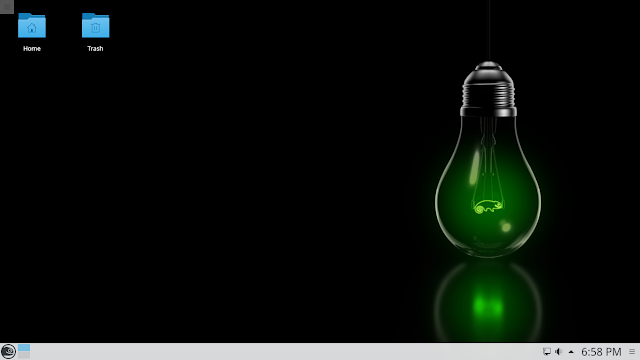
Nice, but of course I had to come up with my own setup:


As with the previous release, the KDE installation of openSUSE 42.2 provides a login option for the IceWM window manager, for when you're in the mood for a lightweight setup:

I'll probably add Fluxbox eventually, but there's enough to explore in the KDE and IceWM setups to keep me happy for now.
I was reluctant to replace 42.1; that release was working great for me. If it ain't broke, don't fix it. But I enjoy doing Linux installations, so I took the plunge, and openSUSE 42.2 hasn't disappointed. openSUSE is still one of the best Linux distros out there.
The release has a support life cycle of about 18 months, but the next Leap release is expected in November 2017.

Jesse Smith's review of openSUSE 42.2 at DistroWatch: https://www.distrowatch.com/weekly.php?issue=20161128#opensuse

I went with a fresh installation instead of an in-place upgrade. Desktop choices offered by the installer: KDE, GNOME, Server (Text Mode), Xfce, Minimal X Window, and Enlightenment. I chose the KDE Plasma desktop, which is at version 5.8.3 in openSUSE 42.2.
After about 30 minutes with the excellent openSUSE installer, I booted into KDE Plasma 5, in Folder View:

Nice, but of course I had to come up with my own setup:


As with the previous release, the KDE installation of openSUSE 42.2 provides a login option for the IceWM window manager, for when you're in the mood for a lightweight setup:

I'll probably add Fluxbox eventually, but there's enough to explore in the KDE and IceWM setups to keep me happy for now.
I was reluctant to replace 42.1; that release was working great for me. If it ain't broke, don't fix it. But I enjoy doing Linux installations, so I took the plunge, and openSUSE 42.2 hasn't disappointed. openSUSE is still one of the best Linux distros out there.
The release has a support life cycle of about 18 months, but the next Leap release is expected in November 2017.

Jesse Smith's review of openSUSE 42.2 at DistroWatch: https://www.distrowatch.com/weekly.php?issue=20161128#opensuse
Tuesday, February 2, 2016
fluxbox in leap
Added Fluxbox to openSUSE Leap 42.1 via the 1-Click Install (see https://software.opensuse.org/package/fluxbox) (this added the X11:windowmanagers repo).
When I logged into Fluxbox, here's the desktop that I was presented with at first:

Not bad, actually. The desktop right-click menu didn't have much in it, but it did have a "Run Command" entry, which is enough to get to work. I'd saved my notes and files from my Fluxbox installation in openSUSE 13.2, so I used those to quickly set things up in 42.1.
I'm using the command fbsetbg -r /home/steve/wallpapers to pull random images from my ~/wallpapers directory. I added feh, then turned on transparency by changing the value of the following line in ~/.fluxbox/init from "false" to "true":
session.forcePseudoTransparency: true
To get a black cursor for Fluxbox, I went to /etc/sysconfig/windowmanager and changed X_MOUSE_CURSOR="DMZ" to X_MOUSE_CURSOR="DMZ-Black", then rebooted for that to take effect.
Here's my ~/.fluxbox/menu file (I think all of these entries work):
# Version 0.1 08.04.2003 - hvogel@hennevogel.de
# Version 0.2 07.12.2004 - hvogel@hennevogel.de
[begin] (Fluxbox Menu)
[exec] (firefox) {firefox}
[exec] (spacefm) {spacefm}
[exec] (konsole) {konsole}
[exec] (geany) {geany}
[include] (~/.fluxbox/menu.xdg)
[submenu] (Tools)
[exec] (chromium) {chromium}
[exec] (dolphin) {dolphin}
[exec] (mirage) {mirage}
[exec] (geeqie) {geeqie}
[exec] (spectacle) {spectacle}
[exec] (gwenview) {gwenview}
[exec] (kcalc) {kcalc}
[exec] (konqueror) {kfmclient openProfile filemanagement}
[exec] (YaST) {/usr/bin/xdg-su -c /sbin/yast2}
[end]
[submenu] (Fluxbox Configuration) {}
[config] (Config)
[workspaces] (Workspace)
[submenu] (System-Styles) {Choose a style...}
[stylesdir] (/usr/share/fluxbox/styles)
[end]
[submenu] (User-Styles) {Choose a style...}
[stylesdir] (~/.fluxbox/styles)
[end]
[end]
[exec] (Run Command) {fbrun}
[exec] (Random Wallpaper) {fbsetbg -r /home/steve/wallpapers}
[exec] (Lock Screen) {xlock}
[restart] (Restart) {}
[exit] (Logout)
[end]
Tinkered some more with the settings, came up with this:

Very nice set-up.
When I logged into Fluxbox, here's the desktop that I was presented with at first:

Not bad, actually. The desktop right-click menu didn't have much in it, but it did have a "Run Command" entry, which is enough to get to work. I'd saved my notes and files from my Fluxbox installation in openSUSE 13.2, so I used those to quickly set things up in 42.1.
I'm using the command fbsetbg -r /home/steve/wallpapers to pull random images from my ~/wallpapers directory. I added feh, then turned on transparency by changing the value of the following line in ~/.fluxbox/init from "false" to "true":
session.forcePseudoTransparency: true
To get a black cursor for Fluxbox, I went to /etc/sysconfig/windowmanager and changed X_MOUSE_CURSOR="DMZ" to X_MOUSE_CURSOR="DMZ-Black", then rebooted for that to take effect.
Here's my ~/.fluxbox/menu file (I think all of these entries work):
# Version 0.1 08.04.2003 - hvogel@hennevogel.de
# Version 0.2 07.12.2004 - hvogel@hennevogel.de
[begin] (Fluxbox Menu)
[exec] (firefox) {firefox}
[exec] (spacefm) {spacefm}
[exec] (konsole) {konsole}
[exec] (geany) {geany}
[include] (~/.fluxbox/menu.xdg)
[submenu] (Tools)
[exec] (chromium) {chromium}
[exec] (dolphin) {dolphin}
[exec] (mirage) {mirage}
[exec] (geeqie) {geeqie}
[exec] (spectacle) {spectacle}
[exec] (gwenview) {gwenview}
[exec] (kcalc) {kcalc}
[exec] (konqueror) {kfmclient openProfile filemanagement}
[exec] (YaST) {/usr/bin/xdg-su -c /sbin/yast2}
[end]
[submenu] (Fluxbox Configuration) {}
[config] (Config)
[workspaces] (Workspace)
[submenu] (System-Styles) {Choose a style...}
[stylesdir] (/usr/share/fluxbox/styles)
[end]
[submenu] (User-Styles) {Choose a style...}
[stylesdir] (~/.fluxbox/styles)
[end]
[end]
[exec] (Run Command) {fbrun}
[exec] (Random Wallpaper) {fbsetbg -r /home/steve/wallpapers}
[exec] (Lock Screen) {xlock}
[restart] (Restart) {}
[exit] (Logout)
[end]
Tinkered some more with the settings, came up with this:

Very nice set-up.
finding the kde version number
Used to be that when I wanted to find the KDE version number, I'd just open a KDE app and click on "About KDE" under the Help menu.
Open up Konsole in Debian Jessie and go to Help > About KDE and you'll see the following window, which shows the KDE version number:

In KDE apps in openSUSE Leap 42.1, which uses Plasma 5, the About KDE window no longer shows the KDE version number:

So, forget Help > About KDE.
Anyway, there's KInfoCenter (Main Menu > Settings > KInfoCenter). In Debian Jessie:

And, KInfoCenter in openSUSE 42.1:

So, I'm running KDE 4.14.2 in Debian Jessie and KDE Plasma 5.4.3 in openSUSE Leap 42.1, and KInfoCenter is still the best GUI way to quickly find the version number in KDE.
Open up Konsole in Debian Jessie and go to Help > About KDE and you'll see the following window, which shows the KDE version number:

In KDE apps in openSUSE Leap 42.1, which uses Plasma 5, the About KDE window no longer shows the KDE version number:

So, forget Help > About KDE.
Anyway, there's KInfoCenter (Main Menu > Settings > KInfoCenter). In Debian Jessie:

And, KInfoCenter in openSUSE 42.1:

So, I'm running KDE 4.14.2 in Debian Jessie and KDE Plasma 5.4.3 in openSUSE Leap 42.1, and KInfoCenter is still the best GUI way to quickly find the version number in KDE.
Sunday, January 31, 2016
hammerin' it into shape
Fixed a few things in openSUSE 42.1. I managed to disable KWallet (which was coming on, for example, whenever I went into Chromium's settings) by doing the following: KMenu > KWalletManager > Settings > Configure Wallet... > Wallet Preferences tab > uncheck "Enable the KDE wallet subsystem. After I did this, I could no longer get the KWalletManager app from the KMenu to work properly (it kept freezing up), but KWallet appears to be disabled.
I finally got Mirage installed, via 1-Click Install, here: https://software.opensuse.org/package/mirage

I had been unable to play .wma music files, but then I found the following note about multimedia codecs (at http://ordinatechnic.com/os-specific-guides/opensuse/opensuse-leap-421-review-supplement):
In addition to adding the PackMan repositories, they must be prioritized over the default openSUSE repositories to prevent a change in package version during updates to those in the default openSUSE repositories. This is important for packages like vlc and vlc-codecs where the PackMan versions, besides being ususally newer, support proprietary codecs and the openSUSE ones don't.
It is also important to be aware of the concept of vendor in openSUSE. If software available from the openSUSE repository has been installed, then the PackMan repository is added, already installed packages can be changed to the versions in the PackMan repositories. This can be done in the YaST Software Management module by viewing packages by repositorym, selecting the PackMan repository, then clicking "Switch System Packages to Versions in this Repository".
(See: https://en.opensuse.org/SDB:Vendor_change_update#Full_repository_Vendor_change)
I followed those steps (this installed/updated a lot of multimedia packages), then logged out of KDE and logged back in. After that, I was able to play .wma, .ogg, and .mp3 files.

There are a few other little things I'd like to get fixed up, but "Leap" 42.1 is shaping up nicely. Always seems to take a bit of post-installation work to get an openSUSE installation set up like I want it; well worth it, in the end.
I finally got Mirage installed, via 1-Click Install, here: https://software.opensuse.org/package/mirage

I had been unable to play .wma music files, but then I found the following note about multimedia codecs (at http://ordinatechnic.com/os-specific-guides/opensuse/opensuse-leap-421-review-supplement):
In addition to adding the PackMan repositories, they must be prioritized over the default openSUSE repositories to prevent a change in package version during updates to those in the default openSUSE repositories. This is important for packages like vlc and vlc-codecs where the PackMan versions, besides being ususally newer, support proprietary codecs and the openSUSE ones don't.
It is also important to be aware of the concept of vendor in openSUSE. If software available from the openSUSE repository has been installed, then the PackMan repository is added, already installed packages can be changed to the versions in the PackMan repositories. This can be done in the YaST Software Management module by viewing packages by repositorym, selecting the PackMan repository, then clicking "Switch System Packages to Versions in this Repository".
(See: https://en.opensuse.org/SDB:Vendor_change_update#Full_repository_Vendor_change)
I followed those steps (this installed/updated a lot of multimedia packages), then logged out of KDE and logged back in. After that, I was able to play .wma, .ogg, and .mp3 files.

There are a few other little things I'd like to get fixed up, but "Leap" 42.1 is shaping up nicely. Always seems to take a bit of post-installation work to get an openSUSE installation set up like I want it; well worth it, in the end.
Sunday, January 24, 2016
42.1 with plasma 5
I wiped out my openSUSE 13.2 installation and replaced it with openSUSE Leap 42.1. The main installation image weighs in at a whopping 4.7GB, so I decided to try the network installation approach and downloaded openSUSE-Leap-42.1-NET-x86_64.iso, only about 85 MB. I went "Old School" and burned the image to a CD using K3b in Debian Jessie, rather than putting the image onto a flash drive like I do to prepare for Linux installations most of the time these days.
I used gparted-live-0.23.0-1-i586.iso from a flash drive to repartition my hard drive, leaving Jessie GNOME as the booting distro and creating new (ext4) partitions for the Leap 42.1 installation.
The Leap 42.1 installer was fairly straightforward. I chose to go with the KDE Plasma desktop. I would have preferred to not have to install GRUB at all, but I couldn't figure out how to proceed with the installation without installing GRUB (same thing happened back when I installed 13.2), so I put GRUB on what would be Leap 42.1's / partition . Took me about two hours to get all the packages downloaded and to get the system installed. Then I booted into a live session (I used MX 14.4 from a flash drive) to fix up fstab and a custom grub entry in Jessie GNOME. Finally, I booted into Leap 42.1's Plasma 5 desktop. The default desktop looked like this:

Not bad, but look at the distorted shape of the lightbulb. I fiddled around with the desktop settings to fix that; undistorted, the wallpaper image is supposed to look something like this:

Anyway, who sticks with the default background? Not me.
I've explored and tweaked the installation over the past couple of days, encountering various crashes and error messages. The system itself doesn't entirely crash or totally freeze up; just looks like some Plasma 5 issues that need to be smoothed out. The system's usable, at least for my purposes.
I've installed a few packages, like multimedia codecs, the SpaceFM file manager, Geany text editor, Geeqie image viewer, and VLC media player.
Not everything has gone smoothly. I haven't been able to play .wma files, but .mp3 and .ogg play fine. There are a few apps that I'd like that I've been unable to install (I'll probably be able to get them later, though).
I'd been running (I think) KDE 4.14.x in openSUSE 13.2, and I still have KDE 4.14.2 in Debian Jessie; going from KDE4 to Plasma 5 (version 5.4.2 in Leap) requires a bit of a mind-set adjustment, as the KDE devs have changed quite a few things and removed some features. For example, here's a shot of the System Settings window, first in KDE4 in Jessie, then in Plasma 5 in Leap 42.1:


Completely reorganized, and in some cases not for the better, in my opinion.
In Plasma 5, users can no longer have different wallpapers for different virtual desktops (first time I've been unable to do that in KDE since I started using Linux!) because there's no longer a "Different widgets for each desktop" option in the Virtual Desktops module. Thumbs down on that decision. While other DEs (Xfce and LXDE, for example) have recently added separate-wallpapers-for-separate-workspaces features (hooray!), the KDE devs decided that the feature wasn't important enough to keep. What's up with that? Pfft.
They took away the Quicklaunch widget for the panel. In KDE4 in Jessie, my Quicklaunch widget conveniently holds eight application launchers in two columns (using a vertical panel):


Can't do that type of things with Plasma 5. The panel can still hold application launchers, but I wasn't able to nicely arrange a bunch of application launchers on my panel without Quicklaunch, so I've gone with a different approach. I got rid of the launchers I'd put on the panel and I set up a desktop right-click Application Launcher menu, with a personalized "apps" submenu:

The default Application Menu ("K" icon on the panel) presents the same menu and submenu, along with a place along the left side for a few "Favorite" application launchers:


Nicely done, actually. So I have a couple of nice ways to launch applications without having the launchers on the panel. As with any other Linux environment, there are, as well, several other ways for users to launch apps, so while I do miss the Quicklaunch widget, it turns out to be not such a big deal.
An app called Spectacle replaces KSnapShot in Plasma 5. Spectacle works pretty well for taking screenshots, but sometimes when using "Save As..." the app doesn't attach the ".png" extension, resulting in error messages like this:

Looks like the workaround is to manually add the ".png" extension when necessary.
I added the Chromium browser, but I find that when I go into Chromium's settings, KWallet starts up:

There's probably a way to completely disable KWallet in Plasma 5, but I haven't found it yet.
openSUSE Leap 42.1 with KDE Plasma 5 isn't perfect, but I can work with it. I've noticed a few other things that I don't like, but also a few things that make me stop and say, "Nice!" The release could use some polishing up, and I'd say that it doesn't meet openSUSE's normal standards, but it's usable; and, openSUSE installations typically improve with age, in my experience. Plasma 5 and Leap 42.1 are still fairly new (will folks accept that as an excuse?). I do wish that there was a live image for users to try out before installing, but the openSUSE devs did away with live images, unfortunately. Life goes on.
Here are links to a couple of fairly detailed reviews of openSUSE 42.1:
http://ordinatechnic.com/distros/distro-reviews/opensuse/opensuse-leap-421-review
http://distrowatch.com/weekly.php?issue=20151116#opensuse
And here's one from Dedoimedo, who was less than pleased with the release: "OpenSUSE Leap 42.1 - Leap? More of a plunge."
I used gparted-live-0.23.0-1-i586.iso from a flash drive to repartition my hard drive, leaving Jessie GNOME as the booting distro and creating new (ext4) partitions for the Leap 42.1 installation.
The Leap 42.1 installer was fairly straightforward. I chose to go with the KDE Plasma desktop. I would have preferred to not have to install GRUB at all, but I couldn't figure out how to proceed with the installation without installing GRUB (same thing happened back when I installed 13.2), so I put GRUB on what would be Leap 42.1's / partition . Took me about two hours to get all the packages downloaded and to get the system installed. Then I booted into a live session (I used MX 14.4 from a flash drive) to fix up fstab and a custom grub entry in Jessie GNOME. Finally, I booted into Leap 42.1's Plasma 5 desktop. The default desktop looked like this:

Not bad, but look at the distorted shape of the lightbulb. I fiddled around with the desktop settings to fix that; undistorted, the wallpaper image is supposed to look something like this:

Anyway, who sticks with the default background? Not me.
I've explored and tweaked the installation over the past couple of days, encountering various crashes and error messages. The system itself doesn't entirely crash or totally freeze up; just looks like some Plasma 5 issues that need to be smoothed out. The system's usable, at least for my purposes.
I've installed a few packages, like multimedia codecs, the SpaceFM file manager, Geany text editor, Geeqie image viewer, and VLC media player.
Not everything has gone smoothly. I haven't been able to play .wma files, but .mp3 and .ogg play fine. There are a few apps that I'd like that I've been unable to install (I'll probably be able to get them later, though).
I'd been running (I think) KDE 4.14.x in openSUSE 13.2, and I still have KDE 4.14.2 in Debian Jessie; going from KDE4 to Plasma 5 (version 5.4.2 in Leap) requires a bit of a mind-set adjustment, as the KDE devs have changed quite a few things and removed some features. For example, here's a shot of the System Settings window, first in KDE4 in Jessie, then in Plasma 5 in Leap 42.1:


Completely reorganized, and in some cases not for the better, in my opinion.
In Plasma 5, users can no longer have different wallpapers for different virtual desktops (first time I've been unable to do that in KDE since I started using Linux!) because there's no longer a "Different widgets for each desktop" option in the Virtual Desktops module. Thumbs down on that decision. While other DEs (Xfce and LXDE, for example) have recently added separate-wallpapers-for-separate-workspaces features (hooray!), the KDE devs decided that the feature wasn't important enough to keep. What's up with that? Pfft.
They took away the Quicklaunch widget for the panel. In KDE4 in Jessie, my Quicklaunch widget conveniently holds eight application launchers in two columns (using a vertical panel):


Can't do that type of things with Plasma 5. The panel can still hold application launchers, but I wasn't able to nicely arrange a bunch of application launchers on my panel without Quicklaunch, so I've gone with a different approach. I got rid of the launchers I'd put on the panel and I set up a desktop right-click Application Launcher menu, with a personalized "apps" submenu:

The default Application Menu ("K" icon on the panel) presents the same menu and submenu, along with a place along the left side for a few "Favorite" application launchers:


Nicely done, actually. So I have a couple of nice ways to launch applications without having the launchers on the panel. As with any other Linux environment, there are, as well, several other ways for users to launch apps, so while I do miss the Quicklaunch widget, it turns out to be not such a big deal.
An app called Spectacle replaces KSnapShot in Plasma 5. Spectacle works pretty well for taking screenshots, but sometimes when using "Save As..." the app doesn't attach the ".png" extension, resulting in error messages like this:

Looks like the workaround is to manually add the ".png" extension when necessary.
I added the Chromium browser, but I find that when I go into Chromium's settings, KWallet starts up:

There's probably a way to completely disable KWallet in Plasma 5, but I haven't found it yet.
openSUSE Leap 42.1 with KDE Plasma 5 isn't perfect, but I can work with it. I've noticed a few other things that I don't like, but also a few things that make me stop and say, "Nice!" The release could use some polishing up, and I'd say that it doesn't meet openSUSE's normal standards, but it's usable; and, openSUSE installations typically improve with age, in my experience. Plasma 5 and Leap 42.1 are still fairly new (will folks accept that as an excuse?). I do wish that there was a live image for users to try out before installing, but the openSUSE devs did away with live images, unfortunately. Life goes on.
Here are links to a couple of fairly detailed reviews of openSUSE 42.1:
http://ordinatechnic.com/distros/distro-reviews/opensuse/opensuse-leap-421-review
http://distrowatch.com/weekly.php?issue=20151116#opensuse
And here's one from Dedoimedo, who was less than pleased with the release: "OpenSUSE Leap 42.1 - Leap? More of a plunge."
Sunday, October 11, 2015
make things a little bit nicer
To get transparency working in Fluxbox in openSUSE 13.2, I had to turn on "Pseudo-Transparency" (Fluxbox Configuration > Config > Transparency > Force Pseudo-Transparency):


From that same Transparency menu, you can then adjust the alpha for focused windows, unfocused windows, and the menu (alpha value: opacity increases to a max of 255).
You can also adjust the alphas for the slit and for the toolbar:

Then get yourself some coffee and get some real work done.


From that same Transparency menu, you can then adjust the alpha for focused windows, unfocused windows, and the menu (alpha value: opacity increases to a max of 255).
You can also adjust the alphas for the slit and for the toolbar:

Then get yourself some coffee and get some real work done.

Monday, January 26, 2015
opensuse, fluxbox, feh
I've been using xli to handle my desktop backgrounds in Fluxbox in openSUSE 13.2, mainly because I incorrectly thought that feh was not available from the openSUSE repos. However, I was running into a few issues with my random wallpaper script; I just couldn't get it to properly autostart when I logged into Fluxbox, even after trying a number of different approaches.
I found one approach that actually did work, in this Arch Linux forum thread. Referring to that, I edited the ~/.fluxbox/startup file, replacing the exec fluxbox line with fluxbox &, and adding code for the sleep function. The resulting startup file looked like this:
#!/bin/sh
#
# fluxbox startup-script:
#
# Lines starting with a '#' are ignored.
# Change your keymap:
xmodmap "/home/steve/.Xmodmap"
# Applications you want to run with fluxbox.
# MAKE SURE THAT APPS THAT KEEP RUNNING HAVE AN ''&'' AT THE END.
#
# unclutter -idle 2 &
# wmnd &
# wmsmixer -w &
# idesk &
# Start fluxbox.
# Because it is the last app you have to run it with ''exec'' before it.
# Jan 25 2015 - changed 'exec fluxbox' to 'fluxbox &'
fluxbox &
fbpid=$!
sleep 2
{
# Applications you want to run after fluxbox has started
# MAKE SURE THAT APPS THAT KEEP RUNNING HAVE AN & AT THE END.
/home/steve/wallpaper-script1 &
} &
wait $fbpid
# or if you want to keep a log:
# exec fluxbox -log "/home/steve/.fluxbox/log"
The only problem with that approach was that if I did a "Restart" from the Fluxbox menu, then Fluxbox, instead of using my random wallpaper script, would use whatever was stored in ~/.fluxbox/lastwallpaper -- and that was whatever wallpaper had last been set by the fbsetbg command.
Then I ran the the following command and took a look at the output:
steve[~]$ fbsetbg -i
display doesn't set the wallpaper properly. Transparency for fluxbox and apps like aterm and xchat won't work right with it. Consider installing feh, wmsetbg (from windowmaker) or Esetroot (from Eterm) and I'll use them instead.
So I went back to YaST and found that, indeed, feh was available for installation. Added that, then ran the above command again:
steve[~]$ fbsetbg -i
feh is a nice wallpapersetter. You won't have any problems.
That's what you're supposed to see. Good.
Still, feh was unable to load any of my wallpapers! If I tried to load a random image from my wallpapers directory, I was seeing this sort of thing:
steve[~]$ fbsetbg -r /home/steve/wallpapers
feh WARNING: /home/steve/wallpapers/hugerock.jpeg - No Imlib2 loader for that file format
feh ERROR: Unable to load image /home/steve/wallpapers/hugerock.jpeg
steve[~]$ fbsetbg -r /home/steve/wallpapers
feh WARNING: /home/steve/wallpapers/red_rocks_on_the_beach-wallpaper-1366x768.jpg - No Imlib2 loader for that file format
feh ERROR: Unable to load image /home/steve/wallpapers/red_rocks_on_the_beach-wallpaper-1366x768.jpg
So I tried using feh with the -U switch to see which wallpapers feh could actually load:
steve[~]$ feh -U /home/steve/wallpapers
steve[~]$
It couldn't load any of 'em. Drat.
From YaST I could see that imlib2-1 was installed, but imlib2 was not, so I installed imlib2 to see if that would help. This also installed imlib2-loaders and libid3tag0.
That fixed the problem!!!
So, I no longer needed my random wallpaper script at all. Instead, I simply added the following line to the ~/.fluxbox/init file:
session.screen0.rootCommand: fbsetbg -r /home/steve/wallpapers
Then, from the Fluxbox menu, I clicked Reconfigure, then Restart, and was presented with a new, random wallpaper. Logged out, then back into Fluxbox, and again was presented with a new, random wallpaper, as expected. Mark this one "Solved."
I found one approach that actually did work, in this Arch Linux forum thread. Referring to that, I edited the ~/.fluxbox/startup file, replacing the exec fluxbox line with fluxbox &, and adding code for the sleep function. The resulting startup file looked like this:
#!/bin/sh
#
# fluxbox startup-script:
#
# Lines starting with a '#' are ignored.
# Change your keymap:
xmodmap "/home/steve/.Xmodmap"
# Applications you want to run with fluxbox.
# MAKE SURE THAT APPS THAT KEEP RUNNING HAVE AN ''&'' AT THE END.
#
# unclutter -idle 2 &
# wmnd &
# wmsmixer -w &
# idesk &
# Start fluxbox.
# Because it is the last app you have to run it with ''exec'' before it.
# Jan 25 2015 - changed 'exec fluxbox' to 'fluxbox &'
fluxbox &
fbpid=$!
sleep 2
{
# Applications you want to run after fluxbox has started
# MAKE SURE THAT APPS THAT KEEP RUNNING HAVE AN & AT THE END.
/home/steve/wallpaper-script1 &
} &
wait $fbpid
# or if you want to keep a log:
# exec fluxbox -log "/home/steve/.fluxbox/log"
The only problem with that approach was that if I did a "Restart" from the Fluxbox menu, then Fluxbox, instead of using my random wallpaper script, would use whatever was stored in ~/.fluxbox/lastwallpaper -- and that was whatever wallpaper had last been set by the fbsetbg command.
Then I ran the the following command and took a look at the output:
steve[~]$ fbsetbg -i
display doesn't set the wallpaper properly. Transparency for fluxbox and apps like aterm and xchat won't work right with it. Consider installing feh, wmsetbg (from windowmaker) or Esetroot (from Eterm) and I'll use them instead.
So I went back to YaST and found that, indeed, feh was available for installation. Added that, then ran the above command again:
steve[~]$ fbsetbg -i
feh is a nice wallpapersetter. You won't have any problems.
That's what you're supposed to see. Good.
Still, feh was unable to load any of my wallpapers! If I tried to load a random image from my wallpapers directory, I was seeing this sort of thing:
steve[~]$ fbsetbg -r /home/steve/wallpapers
feh WARNING: /home/steve/wallpapers/hugerock.jpeg - No Imlib2 loader for that file format
feh ERROR: Unable to load image /home/steve/wallpapers/hugerock.jpeg
steve[~]$ fbsetbg -r /home/steve/wallpapers
feh WARNING: /home/steve/wallpapers/red_rocks_on_the_beach-wallpaper-1366x768.jpg - No Imlib2 loader for that file format
feh ERROR: Unable to load image /home/steve/wallpapers/red_rocks_on_the_beach-wallpaper-1366x768.jpg
So I tried using feh with the -U switch to see which wallpapers feh could actually load:
steve[~]$ feh -U /home/steve/wallpapers
steve[~]$
It couldn't load any of 'em. Drat.
From YaST I could see that imlib2-1 was installed, but imlib2 was not, so I installed imlib2 to see if that would help. This also installed imlib2-loaders and libid3tag0.
That fixed the problem!!!
So, I no longer needed my random wallpaper script at all. Instead, I simply added the following line to the ~/.fluxbox/init file:
session.screen0.rootCommand: fbsetbg -r /home/steve/wallpapers
Then, from the Fluxbox menu, I clicked Reconfigure, then Restart, and was presented with a new, random wallpaper. Logged out, then back into Fluxbox, and again was presented with a new, random wallpaper, as expected. Mark this one "Solved."
Thursday, November 27, 2014
more 13.2
Added Fluxbox to openSUSE 13.2.

Fluxbox isn't in the main openSUSE repos, but it can be found in the X11:windowmanagers repo once that's added. Or -- and this is one cool thing about openSUSE -- users can just go over to the openSUSE Package Search site and take advantage of the handy One-Click Install feature:

That adds the repo and installs the package. Nice!
Fluxbox isn't in the main openSUSE repos, but it can be found in the X11:windowmanagers repo once that's added. Or -- and this is one cool thing about openSUSE -- users can just go over to the openSUSE Package Search site and take advantage of the handy One-Click Install feature:
That adds the repo and installs the package. Nice!
Monday, November 17, 2014
13.2
I replaced openSUSE 12.3 (KDE) with openSUSE 13.2 (KDE). I installed it using the Live KDE option at the Download page, rather than from the full (4.7GB) DVD. This release ships with KDE 4.14.2.


A shot of the default desktop:
And after some customization:
Monday, December 2, 2013
13.1

While I'm very tempted to install this release, I'm also quite happy with openSUSE 12.3 (KDE spin), which will be supported until September, 2014. So, I'm staying put. For now.
Monday, October 28, 2013
13.1's getting close!
openSUSE 13.1 is set for release in about three weeks, and everything's looking good, from what I've read so far; but I haven't decided if I'll install it or not.
As shown at the openSUSE wiki's Lifetime page, openSUSE has a release cycle of about 8 months, and releases receive updates for about 18 months -- each release has a "lifetime" that spans 2 releases plus 2 months.
So, 12.2's support runs until mid-January, 2014, and 12.3 (which I'm running here) is expected to be supported until September 15th, 2014. 12.3 has been great here, so I'm in no hurry to go to 13.1. Plus, I kinda like the idea of riding a release out until the end of its support period, even though so far I haven't managed to hold out that long with this distro's releases.
My first openSUSE installation was the 12.1 release, back in April, 2012; I went to 12.2 in September 2012, then to 12.3 this past March.
For me, openSUSE hasn't been the easiest distro to get installed and set up, but it hasn't been all that difficult, either. And the main repositories don't always have all of the apps that I want to add, but it usually isn't too much trouble to add other repos so I can get those apps.
Overall, openSUSE is one of the best distros I've ever used. Their "installation and configuration tool," YaST, ranks among the best in the business. Software updates are a piece of cake with YaST's Online Update tool. The releases I've used so far have proven to be quite stable and problem-free, and I've been able to find plenty of good documentation at their wiki and forums. I'm tempted to place openSUSE up there with Debian Stable and Ubuntu LTS when I think of the most dependable "major" distros I've used, but I've been running those two distros for several years now, and openSUSE for only about a year and a half. I'll give it more time.
The openSUSE project's home page: http://www.opensuse.org/en/
As shown at the openSUSE wiki's Lifetime page, openSUSE has a release cycle of about 8 months, and releases receive updates for about 18 months -- each release has a "lifetime" that spans 2 releases plus 2 months.
So, 12.2's support runs until mid-January, 2014, and 12.3 (which I'm running here) is expected to be supported until September 15th, 2014. 12.3 has been great here, so I'm in no hurry to go to 13.1. Plus, I kinda like the idea of riding a release out until the end of its support period, even though so far I haven't managed to hold out that long with this distro's releases.
My first openSUSE installation was the 12.1 release, back in April, 2012; I went to 12.2 in September 2012, then to 12.3 this past March.
For me, openSUSE hasn't been the easiest distro to get installed and set up, but it hasn't been all that difficult, either. And the main repositories don't always have all of the apps that I want to add, but it usually isn't too much trouble to add other repos so I can get those apps.
Overall, openSUSE is one of the best distros I've ever used. Their "installation and configuration tool," YaST, ranks among the best in the business. Software updates are a piece of cake with YaST's Online Update tool. The releases I've used so far have proven to be quite stable and problem-free, and I've been able to find plenty of good documentation at their wiki and forums. I'm tempted to place openSUSE up there with Debian Stable and Ubuntu LTS when I think of the most dependable "major" distros I've used, but I've been running those two distros for several years now, and openSUSE for only about a year and a half. I'll give it more time.
The openSUSE project's home page: http://www.opensuse.org/en/
Saturday, October 19, 2013
openbox menu launcher for xfce4-panel
To add add a launcher for the Openbox menu to xfce4-panel in Openbox (in openSUSE 12.3), I referred to these instructions at the Arch Linux wiki (always a great source):
https://wiki.archlinux.org/index.php/Openbox#Linking_the_menu_to_a_button
First, I installed xdotool in openSUSE. Then I added the following lines to my ~/.config/openbox/rc.xml file, in the keyboard section:
<keybind key="A-C-q">
<action name="ShowMenu">
<menu>root-menu</menu>
</action>
</keybind>
Next, I added a new launcher to xfce4-panel; right-clicked on the launcher to open the launcher properties window; on the "General" tab, clicked on the "Edit the currently selected item" button; gave the launcher a name and inserted the following command:
xdotool key ctrl+alt+q

Added an icon for the launcher, clicked "Save," and then restarted Openbox with the following command:
$ openbox --restart
All done.

https://wiki.archlinux.org/index.php/Openbox#Linking_the_menu_to_a_button
First, I installed xdotool in openSUSE. Then I added the following lines to my ~/.config/openbox/rc.xml file, in the keyboard section:
<keybind key="A-C-q">
<action name="ShowMenu">
<menu>root-menu</menu>
</action>
</keybind>
Next, I added a new launcher to xfce4-panel; right-clicked on the launcher to open the launcher properties window; on the "General" tab, clicked on the "Edit the currently selected item" button; gave the launcher a name and inserted the following command:
xdotool key ctrl+alt+q

Added an icon for the launcher, clicked "Save," and then restarted Openbox with the following command:
$ openbox --restart
All done.

Wednesday, July 31, 2013
westcliff
Great interview with Malcolm Moore, Network Manager at Westcliff High School for Girls Academy, in England: A year of Linux desktop at Westcliff High School
Westcliff began switching its "student-facing computers" to Linux (using KDE) about a year ago. They're using openSUSE. Looks like it's working out well!
Westcliff began switching its "student-facing computers" to Linux (using KDE) about a year ago. They're using openSUSE. Looks like it's working out well!
Sunday, June 2, 2013
evergreen
Interesting project that I just became aware of: openSUSE "Evergreen."
The normal support period for openSUSE releases is "two releases plus two months," which works out to about an 18-month time span. Evergreen "is a community effort to prolong maintenance of selected openSUSE versions as they reach official end-of-life" -- kind of an LTS type of thing, I guess, but not "official" like Ubuntu LTS releases.
For more info, follow this link: http://en.opensuse.org/openSUSE:Evergreen
The normal support period for openSUSE releases is "two releases plus two months," which works out to about an 18-month time span. Evergreen "is a community effort to prolong maintenance of selected openSUSE versions as they reach official end-of-life" -- kind of an LTS type of thing, I guess, but not "official" like Ubuntu LTS releases.
For more info, follow this link: http://en.opensuse.org/openSUSE:Evergreen
Monday, April 22, 2013

Sunday, April 14, 2013
razor-qt
In openSUSE 12.2 (KDE), I used YaST to add the QtDesktop repo, then installed Razor-qt 0.5.2, which is the latest version.
When you first run Razor-qt, you get a choice of window managers to use. Since I already had Openbox installed, I chose that (the other choice given was KWin).
Here's what the default desktop looked like:

I changed the wallpaper and tweaked the panel a bit:

This shot shows the desktop right-click menu:

The Razor-qt Configuration Center in openSUSE 12.2 (KDE):

Here's what you'll see if you click on "Unlock Desktop..." from the desktop right-click menu:

Razor-qt is still a fairly new project, so users might find it to be a wee bit buggy. For example, configuring the date and time is easy enough, but the font size for the date doesn't seem to survive when logging out and back into a new session.

Very promising project, though, and it appears to be completely usable right now.
When you first run Razor-qt, you get a choice of window managers to use. Since I already had Openbox installed, I chose that (the other choice given was KWin).
Here's what the default desktop looked like:
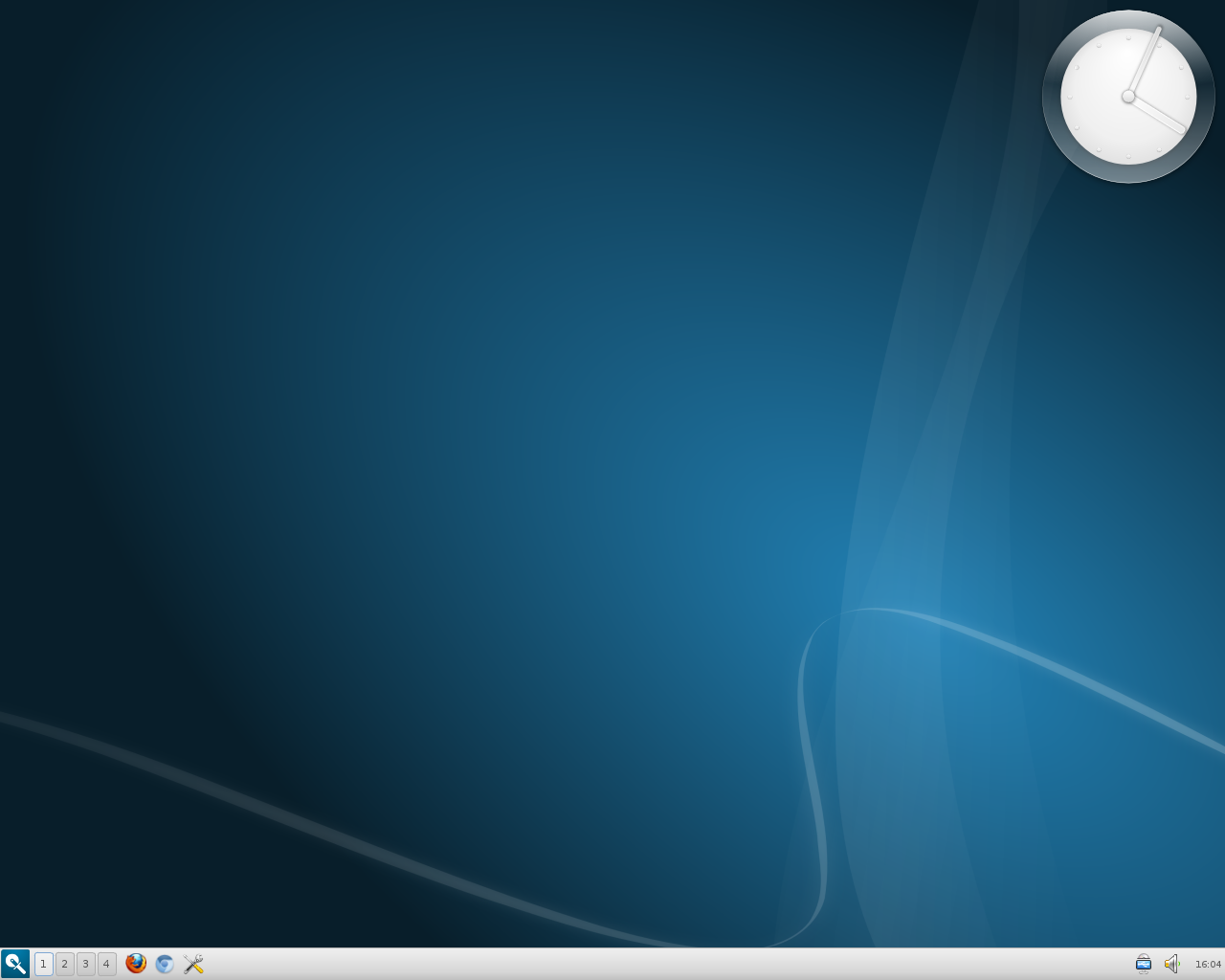
I changed the wallpaper and tweaked the panel a bit:

This shot shows the desktop right-click menu:

The Razor-qt Configuration Center in openSUSE 12.2 (KDE):

Here's what you'll see if you click on "Unlock Desktop..." from the desktop right-click menu:

Razor-qt is still a fairly new project, so users might find it to be a wee bit buggy. For example, configuring the date and time is easy enough, but the font size for the date doesn't seem to survive when logging out and back into a new session.

Very promising project, though, and it appears to be completely usable right now.
Monday, March 25, 2013
there's a trick to it
Jesse Smith's review of openSUSE 12.3 in this week's DistroWatch Weekly mentioned some installation difficulties that he encountered. In the DW comments section, "Andy Prough" posted the following:
One trick to installing openSUSE is to always try to download and install from the full DVD if possible. This distro doesn't seem to do near as well as Ubuntu and Mint at shoving everything you need into a smaller Live CD/DVD version. I've recommended that they stop producing the Live CD/DVD's if they aren't going to be able to control the quality of installation, or that they at least post a strong warning to avoid installing from that media. I think this may have contributed to the installation problems Jesse ran into as well.
If you go to the openSUSE forums, you'll find that most of the long-time users refuse to install from the live media or the Net install - they only use the full DVD. Although it takes longer to download, you get the added advantage of having a full repair disk plus an emergency off-line repository with thousands of software packages.
That's probably a good point; for my opensSUSE installations (12.1, 12.2, and 12.3 -- on a couple of different computers), I've used the KDE live disk each time. While I've managed to get each release installed, and each installation seemed easier than the previous one, my impression has been that openSUSE isn't the easiest distro to install. However, I figured that any difficulties I've had were the result of my not being familiar with the distro combined with the fact that I was adding them to my multi-boot set-ups.
Next time around, I may just do what was mentioned above -- go with the full DVD.
One trick to installing openSUSE is to always try to download and install from the full DVD if possible. This distro doesn't seem to do near as well as Ubuntu and Mint at shoving everything you need into a smaller Live CD/DVD version. I've recommended that they stop producing the Live CD/DVD's if they aren't going to be able to control the quality of installation, or that they at least post a strong warning to avoid installing from that media. I think this may have contributed to the installation problems Jesse ran into as well.
If you go to the openSUSE forums, you'll find that most of the long-time users refuse to install from the live media or the Net install - they only use the full DVD. Although it takes longer to download, you get the added advantage of having a full repair disk plus an emergency off-line repository with thousands of software packages.
That's probably a good point; for my opensSUSE installations (12.1, 12.2, and 12.3 -- on a couple of different computers), I've used the KDE live disk each time. While I've managed to get each release installed, and each installation seemed easier than the previous one, my impression has been that openSUSE isn't the easiest distro to install. However, I figured that any difficulties I've had were the result of my not being familiar with the distro combined with the fact that I was adding them to my multi-boot set-ups.
Next time around, I may just do what was mentioned above -- go with the full DVD.
Subscribe to:
Posts (Atom)
