Sunday, February 24, 2019

spartans, wolverines

Michigan vs. Michigan State has been one of college basketball's greatest rivalries. Today they played at UofM's Crisler Arena in Ann Arbor, with MSU coming out on top, 77-70. Huge road win for the Spartans, who (for the moment) take over 1st place in the Big Ten Conference standings.

The two teams will meet again on March 9th in East Lansing. UofM leads head-to-head over the years, 100-82. In the NCAA Tournament, all-time, MSU can claim bragging rights, but not by much:

National Championships - Michigan State 2, Michigan 1
Tournament 2nd Place finishes - Michigan 6, Michigan State 1
Final Fours - Michigan State 9, Michigan 8
Elite Eights - Michigan 14, Michigan State 13
Sweet Sixteens - Michigan State 19, Michigan 15
Tournament Appearances - Michigan State 32, Michigan 28

Monday, February 18, 2019

all the number ones

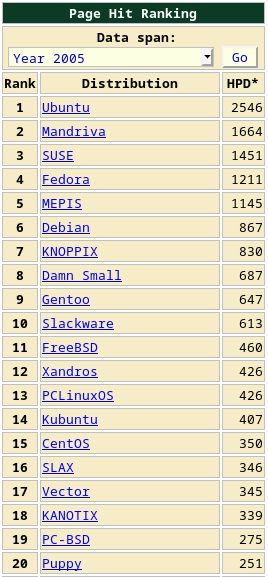
A little history for ya. The No. 1 distros for each calendar year, according to the page hit rankings at DistroWatch:

2002 - Mandrake
2003 - Mandrake
2004 - Mandrakelinux
2005 - Ubuntu
2006 - Ubuntu
2007 - Ubuntu
2008 - Ubuntu
2009 - Ubuntu
2010 - Ubuntu
2011 - Mint
2012 - Mint
2013 - Mint
2014 - Mint
2015 - Mint
2016 - Mint
2017 - Mint
2018 - Manjaro


There's a good chance that MX Linux will be the No. 1 for 2019.

The Top 20 distros for 2005, when I first got going with Linux (I was running Linspire and playing around with KNOPPIX; I switched to MEPIS later), according to DistroWatch's page hit rankings:


And the Top 20 over the past 30 days:


How things have changed! Note that Debian comes in at #6 on both lists.

Sunday, February 17, 2019

openbox: dmenu, gmrun

I haven't decided which application launcher I like better between gmrun and dmenu. Here's a shot of my Openbox menu in Arch, with obmenu opened to show how I set up gmrun and dmenu menu entries:


But I also have keystrokes for gmrun (Alt+F2) and dmenu (Super+Space). From the "keyboard" section of ~/.config/openbox/rc.xml:

    <!-- Added by Steve -->
    <!-- Winkey+Space starts dmenu -->
    <keybind key="W-space">
      <action name="Execute">
        <command>dmenu_run -b</command>
      </action>
    </keybind> 
    <!-- Added by Steve -->
    <!-- Alt+F2 starts gmrun -->
    <keybind key="A-F2">
      <action name="execute">
         <execute>gmrun</execute>
      </action>
    </keybind>


The menu entries are handy to have, but I normally use the keystrokes.
 

Thursday, February 7, 2019

purge residual config files via GUI or CLI

From Synaptic in Kubuntu 18.04, I clicked on the "Status" button and found three items listed under "Not installed (residual config)":


One way to get rid of those is to select each item and mark them for "Complete Removal", then click the "Apply" button. However, they can also be found and removed via the command line. To find them, I used the dpkg -l | grep ^rc command:

$ dpkg -l | grep ^rc
rc  linux-image-4.15.0-42-generic                   4.15.0-42.45                                amd64        Signed kernel image generic
rc  linux-modules-4.15.0-42-generic                 4.15.0-42.45                                amd64        Linux kernel extra modules for version 4.15.0 on 64 bit x86 SMP
rc  linux-modules-extra-4.15.0-42-generic           4.15.0-42.45                                amd64        Linux kernel extra modules for version 4.15.0 on 64 bit x86 SMP


See man dpkg and man dpkg-query for info about the -l (--list) option.

Then, I used apt purge and a little copy-and-paste magic:

$ sudo apt purge linux-image-4.15.0-42-generic linux-modules-4.15.0-42-generic linux-modules-extra-4.15.0-42-generic


Saturday, February 2, 2019

still rockin' deuterium

A few shots of BunsenLabs Deuterium (based on Debian Jessie):


With BL Deuterium, I'm using updated versions of Firefox and Pale Moon (downloaded from their web sites), but the rest of the apps come from the Jessie repos. Jessie is the current "oldstable," which should be supported until maybe June of this year, I'm guessing. See: https://wiki.debian.org/DebianOldStable

Also, I prefer to use Double Commander instead of the default "BL File Manager" (Thunar). Beyond that, I haven't done much to Deuterium besides a little bit of cosmetic tweaking.

Monday, January 28, 2019

return to forever

Listening to: Light as a Feather, the second studio album by Chick Corea and Return to Forever (recorded October, 1972, I.B.C. Studios, London).


Tracks:

1. "You're Everything"
2. "Light as a Feather"
3. "Captain Marvel"
4. "500 Miles Hight"
5. "Children's Song"
6. "Spain"

Personnel:

Chick Corea - electric piano
Stanley Clarke - double bass
Joe Farrell - tenor saxophone, flute
Airto Moreira - drums
Flora Purim - vocals, percussion

Info: https://en.wikipedia.org/wiki/Light_as_a_Feather

Monday, January 21, 2019

two xfce setups

I took a look at the live session of MX-18 "Continuum" and compared it to my Debian Stretch Xfce installation.

MX-18 comes loaded with apps and tools, many of which I don't have (and don't need) in my Stretch installation, but also many that are nice to have handy. Also, I like that MX's live session (when run from a flash drive) offers options for persistence (root or home).

MX puts the xfce4-panel along the left side, oriented vertically; I do that, too, although my desktop setup is much different than the MX-18 default. Here's a shot from MX-18, with a few application windows open:


This one is from my Stretch Xfce setup; the open windows are xfce4-terminal, Double Commander (instead of Thunar), and Geany (instead of Featherpad):


In MX-18, clicking on the MX icon on the panel brings up the Whisker menu, while right-clicking on the desktop opens a more traditional Xfce menu. Lots of stuff in there!


Over in Debian, I use only the Applications menu, which I can bring up either by clicking on the Debian icon on the panel or by right-clicking on the empty desktop:


The empty default MX-18 desktop, and my empty Stretch Xfce desktop:


I'm quite happy with my Stretch Xfce installation, which is why I don't have MX installed. But I like having MX around on a flash drive for when I need a nice live session. The MX-18 "Continuum" release provides an excellent and very useful live session, right up there with the best live sessions I've ever seen. Wonderful little distro!