Wednesday, July 20, 2011

long live mepis

Warren Woodford came out with the Debian Stable-based Mepis before Ubuntu existed. It wasn't the first Linux live CD, but Woodford's creation gave us a live/installation CD -- a complete, easy-to-use system that could be run from the CD or used to install Linux to the hard drive.

I've been using Mepis since early 2006. During that time, I've also used several other distros, but Mepis continues to be the one distro that I fall back on. The live CD (and now, the live DVD) has been convenient to have around, and I know I can count on Woodford to turn out quality releases.

So, why hasn't Mepis become more popular than it is now?

Being based on Debian Stable means that Mepis doesn't come with the latest and greatest packages. (By the way, for a short time, Mepis was based on Ubuntu; the experiment didn't last, and Mepis moved back to a Debian Stable base.) Mepis users can acquire more up-to-date packages the Debian way -- by creating a "mixed system" and pulling things in from the Testing or Unstable repos, or by compiling packages on their own. They can also get newer stuff from Mepis' Community Repos. But those aren't always good solutions for people who want things a bit more "cutting edge" out of the box.

The Debian Stable base, along with the fact that Mepis is a one-man distro, produced, primarily, by a guy who has limited time and resources, means that you don't see Mepis in the news as often as other distros like PCLinuxOS, Ubuntu, Linux Mint, and Fedora. Woodford puts out one version of Mepis -- it's always just a KDE distro. Other distros have several different versions and release more frequently; Mepis releases come out once a year, at best -- Woodford releases it when it's ready, and usually it takes longer than one year for the next version to come out. So we don't see as many announcements about Mepis at sites like DistroWatch, for example, as we see about other distros.

Most people in the Mepis community don't hear from Woodford much. He doesn't participate at the Mepis forums. He tweets, but not often. He's great at putting out a solid distro, but not so great at selling it to the Linux public. His eccentricities may put off a lot of people, and many people would rather not use a one-man distro as their primary operating system. I mean, what happens if Woodford croaks?

Also, folks have questioned Woodford's commitment to the project. The guy has to work for a living; he's got other things going on in his life, and doesn't say much, if anything, about the long-term direction of the project. Several times, Ive wondered if the current release would be the last. There are no guarantees that Woodford won't bail on the project at any given time. Many people aren't comfortable with things being up in the air like that.

My take on that is that a Debian Stable-based Mepis release is good for a few years -- for the life of the current Stable (a couple of years), and a bit longer if you don't mind not receiving updates for awhile. It should be fine to use for quite some time. After that, it's anybody's guess.

The uncertainty and the lack of popularity don't keep me from sticking with Mepis, though. I decided awhile back to just enjoy the ride. Woodford's release always seem to be a little bit less than perfect; you'll see a few bugs here and there. But Mepis is always solid, stable, and quick and easy to install. No major surprises slap you in the face; from one version to the next, you pretty much know what to expect.

The Mepis community is one of the most knowledgeable, friendly communities out there. They'll bend over backwards to help someone out at the Mepis forums. You're free to discuss other distros at the forums, but distro-bashing is held to a minimum -- forum moderators don't have to step in very often, because, to a large extent, the forum membership polices itself. They know what a good thing they have going there, and they aren't about to let some troll step in and ruin it. Politics, religion, and personal insults are not tolerated.

The documentation is very good, and you can also fall back on the larger body of Debian documentation because so much of it applies to Mepis as well.

As Woodford has found himself more stretched for time, the community has stepped up to the plate, helping out quite a bit with documentation and with testing alpha and beta releases on different hardware and providing Woodford with important feedback. Increasingly, they've contributed artwork, helping to smooth out the rough edges in an area that hasn't been one of Woodford's strengths.


Mepis remains one of the best-kept secrets in the Linux world. I recently joked that it should be named "secretMepis" instead of the official "simplyMepis." Its users swear by it. Even with the relative lack of popularity, Mepis generally seems to have a good reputation among folks who've been around Linux for awhile -- a reputation for quality, consistency, stability, and ease-of-use out of the box.

Anytime another computer falls into my hands, whether it's new or simply "new to me," the first thing I do is try a Mepis live CD (recently, a live DVD) on it. If that works (and it almost always does), the next thing I do is install Mepis. It's got a great track record here, which is why I've contined to use it, and why I'll stay on board and enjoy the ride for as long as Woodford continues to do his thing.

Tuesday, July 19, 2011

should be interesting

Saturday, Juan Manuel Márquez KO'd Likar Ramos in the 1st round, setting up Márquez' November 12th rematch with Manny Pacquiao.

Back in 2004, Márquez and Pacquiao fought to a draw after Márquez came back from being knocked down three times in the 1st round.

In 2008, Pacquiao beat Márquez on a split decision. Márquez went down in the 3rd round in that fight.

The first fight was at featherweight, the second at super-featherweight. I think the fight in November will be at welterweight.

Both of those two fights were controversial and the decisions could have gone either way. I don't think anyone in recent years has fought Pacquiao as well as Márquez did.

Everybody wants to see Pacquiao vs. Mayweather, but I seriously doubt that would be as good a fight as Pacquiao vs. Márquez.

Márquez fought Mayweather in 2009 at 144 lbs. Márquez was moving up in weight and didn't look so hot; he came in at 142. Mayweather came in over the limit at 146, which cost him a financial penalty, and Mayweather won the unanimous decision.

Márquez is 53-5-1 with 39 KOs. It'll be interesting to see if older Márquez vs. older Pacquiao at welterweight will be anything like young Márquez vs. young Pacquiao at featherweight and super-featherweight. It's also interesting because if Pacquiao loses the fight, there goes any chance for Pacquiao vs. Mayweather. Another interesting point is that Márquez couldn't handle Mayweather, so how can Pacquiao handle him? Is Pacquiao that much better than he was before? The "experts" say so, but we'll have to see.

One thing's for certain: Márquez is a tough Mexican fighter with a great record who has never been stopped. Should be interesting to see if Pacquiao can finally stop him in November.

Wednesday, July 13, 2011

wally in unity

For automatic, timed wallpaper changes in Unity in Ubuntu 11.04 (Natty), I found that Wally Wallpaper Changer works, with a few tweaks.

First, I installed wally via Synaptic. Then, I followed the instructions regarding Unity from this web page: http://ubuntuincident.wordpress.com/2011/01/10/wallpaper-changer/

Update (20110509) [Unity patch]

Wally exists in the system tray. However, Ubuntu 11.04 introduced Unity that comes with a new top panel and applications are not allowed to be there by default. You need to enable explications explicitly. If you want to continue using wally, here is what to do:

First, get your current settings for systray-whitelist:

gsettings get com.canonical.Unity.Panel systray-whitelist

Then, add your application to the above list with this command:

gsettings set com.canonical.Unity.Panel systray-whitelist "[ your_previous_list_here, 'wally']"


Next, I set up Wally to start at log-in by going to System Settings > Startup Applications and adding an entry for Wally there. Then I logged out and back in to make sure Wally started up and showed up on the panel at the top of the screen.

I set up a directory in my home directory and filled it with wallpapers. To make Wally pull from this list of Wallpapers, I right-clicked on the Wally icon on the panel and selected the "Folders" module. Then I added my wallpapers directory:


From the "Settings" module, I set Wally to change every 10 minutes, set the position to "Centered Maxpect," and put check marks in the boxes next to "Choose in random order," "Switch background on play," and "Play automatically on application start." At the bottom of the window, I made sure that the only active modules are "Folders" and "Files."


I raided interfacelift.com for a bunch of cool wallpapers to add to my collection, then kicked back to enjoy!

Friday, July 8, 2011

rekonq

I'm testing out the Rekonq web browser in KDE 4.6.3, in Fedora 15. The version is Rekonq 0.6.1.

Looks like a nice little browser. The tabs are placed below the bookmark bar instead of up at the top like in Chromium. Rekonq has a nice feature where, when the cursor hovers over a tab, a thumnail pops up showing the web page that's open in that tab.


Rekonq is supposed to be getting support for Chrome extensions, but it looks like that hasn't happened yet, so that's a minus. It does come with an ad-blocker, but the ad-blocker doesn't block the texts ads here in Gmail. Seems to work fine otherwise, though.

One extension that I really miss having is Xmarks, but I was able to import my bookmarks from Firefox into Rekonq, and that worked out well.

Rekonq seems to be a bit halting at first when opening up web pages, but then fairly speedy when it finally opens them up. Scrolling up and down in web pages with the mouse's scroll wheel seems a lot smoother than in Chromium.

You can set the new tab page to open up to "Bookmarks," which I find useful.

Then, when you open a new tab, you'll see something like this:


Overall, Rekonq is a nice web browser, but it still needs some work.

desktop stuff

Good 'ol Dedoimedo. He wasn't exactly complimentary in his Xubuntu 11.04 review, but he calls 'em like he sees 'em. He admits that he's no Xfce fan, and he clearly doesn't like Thunar (well, I'm not crazy about Thunar, either), but I found it interesting to read about the issues he had with Xubuntu.

I've used Xfce in Mint, from the Ubuntu repos, and that was fine. But everything I've read makes me think that Xubuntu is not such a good Xfce distro, and the things Dedoimedo says about it don't make it sound any better.

Mint's Xfce version, by the way, is now based on Debian Testing, and I'm getting the impression that it's looking nice and would be a better choice than Xubuntu. Myself, I like Xfce in SalineOS, just seems like a very nice implementation.

A weird thing about Xfce in Fedora 15, the other day I was using it and then logged out of the session and into a KDE session, and the KDE menu was replaced by the Xfce menu! Okay, that wasn't cool. But when I rebooted and went back into KDE, everything was back to normal. I'm thinking that it has something to do with menu Xfce uses now, but maybe it's just a Fedora bug.

Speaking of bugs, there was one in KDE4 around version 4.6.1 where the application launcher in the desktop right-click menu wasn't working. I first saw that in PCLOS, then in Fedora. That got fixed, but then another one popped up that I'm seeing in 4.6.3 in Fedora 14 and 15, the same application launcher starts up two instances of any application you open up. It only happens from the desktop right-click menu. I found the bug report and saw that Aaron Seigo has pushed the patch through, so that bug shouldn't be there when Fedora brings in the next KDE4 version (which should be soon; PCLOS has version 4.6.5 now, and Fedora seems bring them in not too far behind PCLOS).

So, even a KDE4 fanboy like me has to admit to still seeing a few bugs creeping up here and there in KDE4! Fortunately, both of these were in the same area, and didn't bother me much because the application launcher in the panel's main menu wasn't affected. But it adds fuel to the fire for those of you who don't like hearing that "the next version of KDE4 is the best!" :)

I'm enjoying playing around with Unity in Ubuntu 11.04 ("Natty"); it's a lot nicer than I though it would be. Quite a bit more configurable than I expected, too, but I found that I had to add a couple of tools to enhance the configurability, and my feeling is that those tools should be included by default. But isn't that the GNOME way of doing things (although, I guess techinically Unity is a separate thing from GNOME proper)?

Unity is good to work with. It has good tools for getting around the desktop, and generally it has a good flow to it, especially after you get used to it. I've found a few things that I don't like about it, and each of those are things that folks are complaining about, so perhaps they'll be addressed fairly soon. But I also found some web pages that have some really nice tips for using Unity, and those were some great finds (for example, see http://www.techdrivein.com/search/label/Ubuntu%2011.04). I tweaked the launcher (the panel along the left side) to make it a lot less, um, annoying and gaudy, but I'm thinking that it would be a lot nicer if it could be placed elsewhere on the desktop -- like at the bottom of the screen, maybe.

I think Unity is going to be great for a lot of people, and I can see where a couple of tweaks here and there will make it a lot nicer, so I'm looking forward to installing Ubuntu 12.04 next year. I think I'll have fun with it. Still, the next time I logged into a KDE4 session, I was happy to be back to a more "traditional" desktop! ("Traditional" in the sense of having a panel and normal menus.)

I've only seen a couple of very minor bugs in Natty so far, but a friend of mine has been talking about a "white screen of death" issue that he's seeing. I'm thinking that it's some kind of graphics driver problem, perhaps, because I haven't encountered it. Natty also comes with an option to log into a traditional GNOME session; I've taken a quick look at it to make sure that it works, but quickly switched back to Unity because it's just more interesting to me right now.

Thursday, July 7, 2011

notebook

I prefer using my big, old, clunky pc instead of a laptop, notebook, netbook, or whatever. But I needed a working, spare computer. I was going to just look for a used pc, or even a cheap new pc, but the convenience of a laptop eventually won the day.

The one I found? The HP Compaq Presario CQ56-219WM Notebook from Walmart. $278 bucks. 250 GB drive, 2 GB RAM, CD/DVD drive, 3 USB ports, 15 inch display, Intel(R) Pentium(R) 4 CPU 3.00GHz.

I tried my Ubuntu Natty live CD on it. Then I tried Natty from a MultiSystem live flash drive (for info, see http://www.pendrivelinux.com/multiboot-create-a-multiboot-usb-from-linux/). Then I tried my Mepis 11 live DVD on it.

Then I used KDE Partition Manager from the Mepis 11 DVD and wiped out Windows from the hard drive. Deleted every partition that was there. Re-partitioned, then installed Mepis 11.

Looks beautiful, runs great.

Because the drives on my main pc are all filled up with other distros, I'm considering adding a Ubuntu Natty installation to the notebook, just to test things out, see how things go. Haven't decided yet; I'm just glad to have something else to get online with when I can use my main pc.

In the past, I was using an old Balance notebook as a spare. It originally came with Linspire, but I have Kubuntu Dapper sitting on it now. But I've been unable to get a broadband connection with it, and installing other distros on it has been, at times, problematic. It was time to retire it, quite simply. It served me well.

M.A.L. has a new MacBook Pro. I joke that I could have gotten 3 or 4 new computers for the price of that MacBook Pro. Actually, it's no joke, and I'm sure I'm as happy running Linux on my Presario as he is running OS-X on his MacBook Pro.

Hopefully, I won't end up regretting this purchase, but $278 wasn't much. Everything looks great so far.

Wednesday, July 6, 2011

unity ain't so bad

I finally got a chance to take a look at Unity, from the Ubuntu 11.04 (Natty) live CD.

I'm having no trouble getting around in there, and my feeling right now is that some people are getting all worked up over nothing. It's different from what people are used to, but it's just another look for Linux. It's still just Linux. Folks can choose to use it, or not.

With Ubuntu, I normally only install the LTS (Long-Term Support) versions, so I don't think I'll be installing Natty. I'll wait until Ubuntu 12.04 comes out next year. But I don't think I'll have any problem using Unity. I'll probably do what I always do, though, and add something like Xfce or Openbox.

Here are some screen shots of from the live CD, starting with a view of the workspace switcher:


My first thought about the workspace switcher was that it takes an extra click or two to do things, but I do like the design. It's easier to access than KDE4's desktop grid (see http://monksblog-malspa.blogspot.com/2011/06/kde4-desktop-grid.html) but otherwise it works about the same way.

A couple of Nautilus windows opened up:


The launcher along the left side kinda annoys me; too gaudy, too cartoon-ish. But it's easy enough to use. I installed CompizConfig Settings Manger and set the launcher to "auto-hide," but it also disappears when you maximize a window. Here's the terminal, maximized:


And the terminal, re-sized, with the launcher hidden:


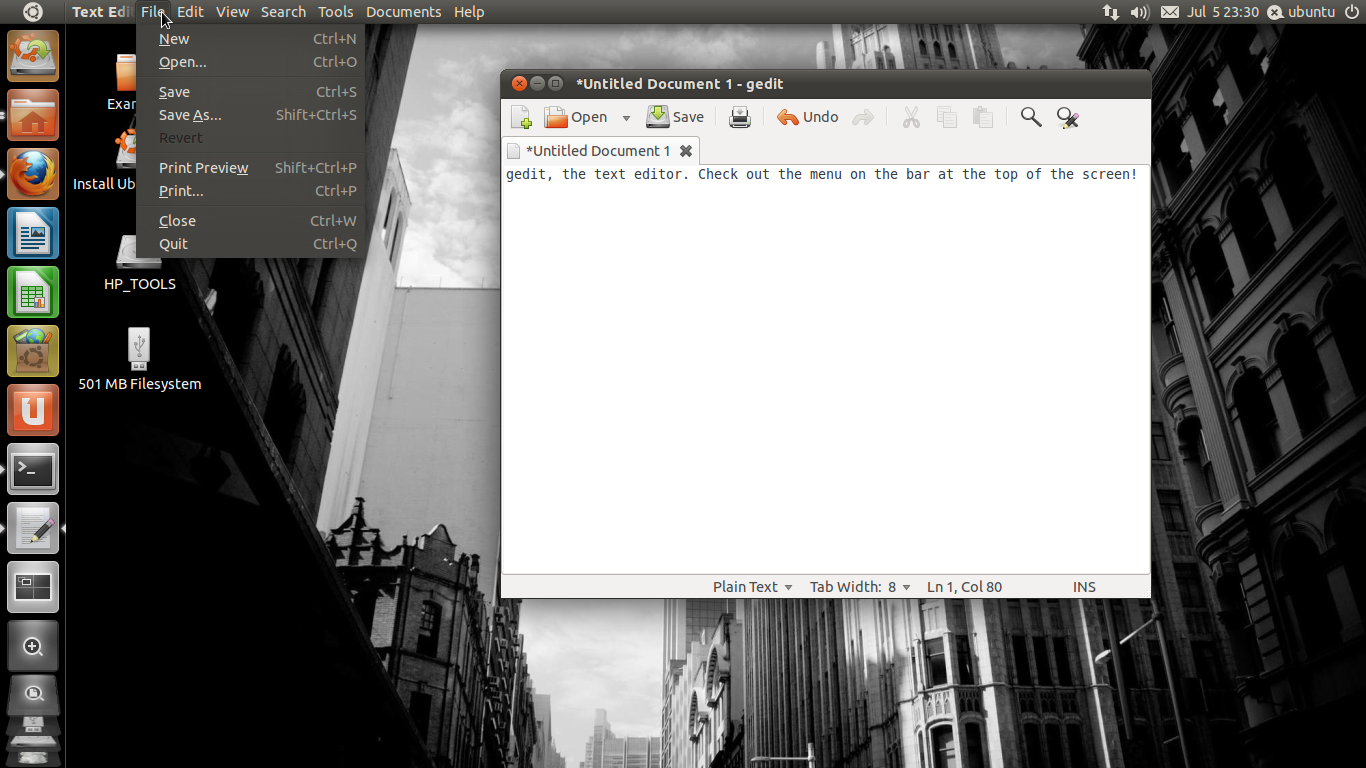
The application menus show up in Unity's top panel instead of at the top of the application window:


A couple of different ways of accessing things in the menu:


Overall, I don't think I'll have any trouble getting used to Unity, but I don't think it'll become my favorite.